🎉 v0.0.152 out now - released 13 hours ago!💫 "Biggest increase in productivity since Cursor" - Luke Harries✨ Fix log streaming race condition for multiple concurrent dev servers (Vibe Kanban) by @anastasiya1155 in https://github.com/BloopAI/vibe-kanban/pull/2027🎉 v0.0.152 out now - released 13 hours ago!✨ Set up React Compiler by @t3dotgg in https://github.com/BloopAI/vibe-kanban/pull/2030✨ fix(services): support git worktree repo paths by @bgColorGray in https://github.com/BloopAI/vibe-kanban/pull/2015✨ fix: resolve ESLint tsconfig.json path using absolute path by @t3dotgg in https://github.com/BloopAI/vibe-kanban/pull/2033🎉 v0.0.152 out now - released 13 hours ago!✨ Add repository settings option to Git panel dropdown (Vibe Kanban) by @anastasiya1155 in https://github.com/BloopAI/vibe-kanban/pull/2028🚀 "This project is underrated. I've found it to be useful and fun" - Hamel Husain🔥 Latest features available in v0.0.152🎉 v0.0.152 out now - released 13 hours ago!⭐ Star us on GitHub to stay updated💫 "Biggest increase in productivity since Cursor" - Luke Harries✨ Fix log streaming race condition for multiple concurrent dev servers (Vibe Kanban) by @anastasiya1155 in https://github.com/BloopAI/vibe-kanban/pull/2027🎉 v0.0.152 out now - released 13 hours ago!✨ Set up React Compiler by @t3dotgg in https://github.com/BloopAI/vibe-kanban/pull/2030✨ fix(services): support git worktree repo paths by @bgColorGray in https://github.com/BloopAI/vibe-kanban/pull/2015✨ fix: resolve ESLint tsconfig.json path using absolute path by @t3dotgg in https://github.com/BloopAI/vibe-kanban/pull/2033🎉 v0.0.152 out now - released 13 hours ago!
Upcoming Event

Ultimate Agents Hackathon

Sat, Oct 25 • 9 AM–9 PM ETBetaworks NYC$5k+ prizes

Move faster with
Claude Code

Vibe Kanban lets you run coding agents in parallel without conflicts, and perform code review through our diff tool. Now you can focus on planning and quality instead of watching terminal logs.

Install Node.js 18+ then run:
$npx vibe-kanban
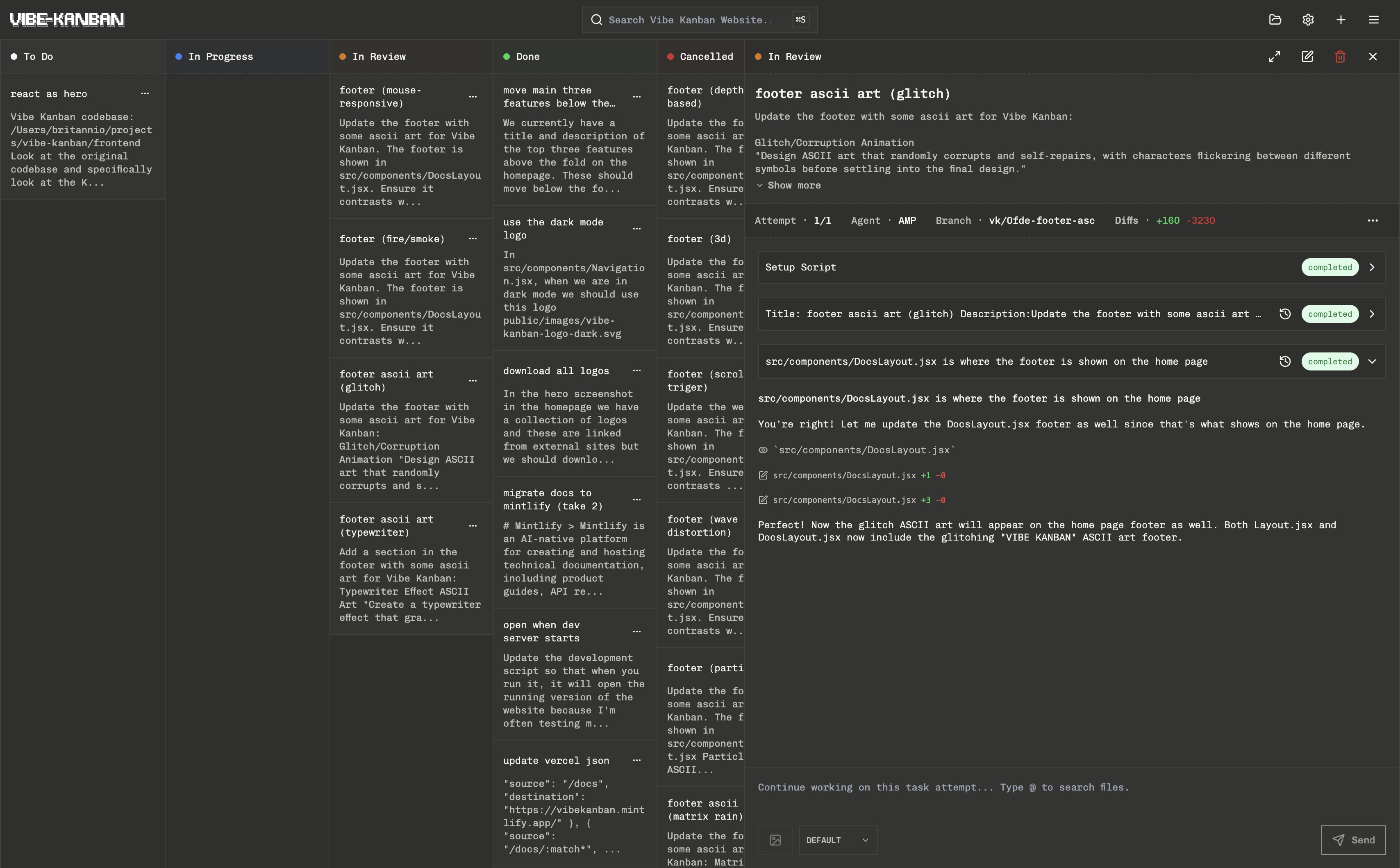
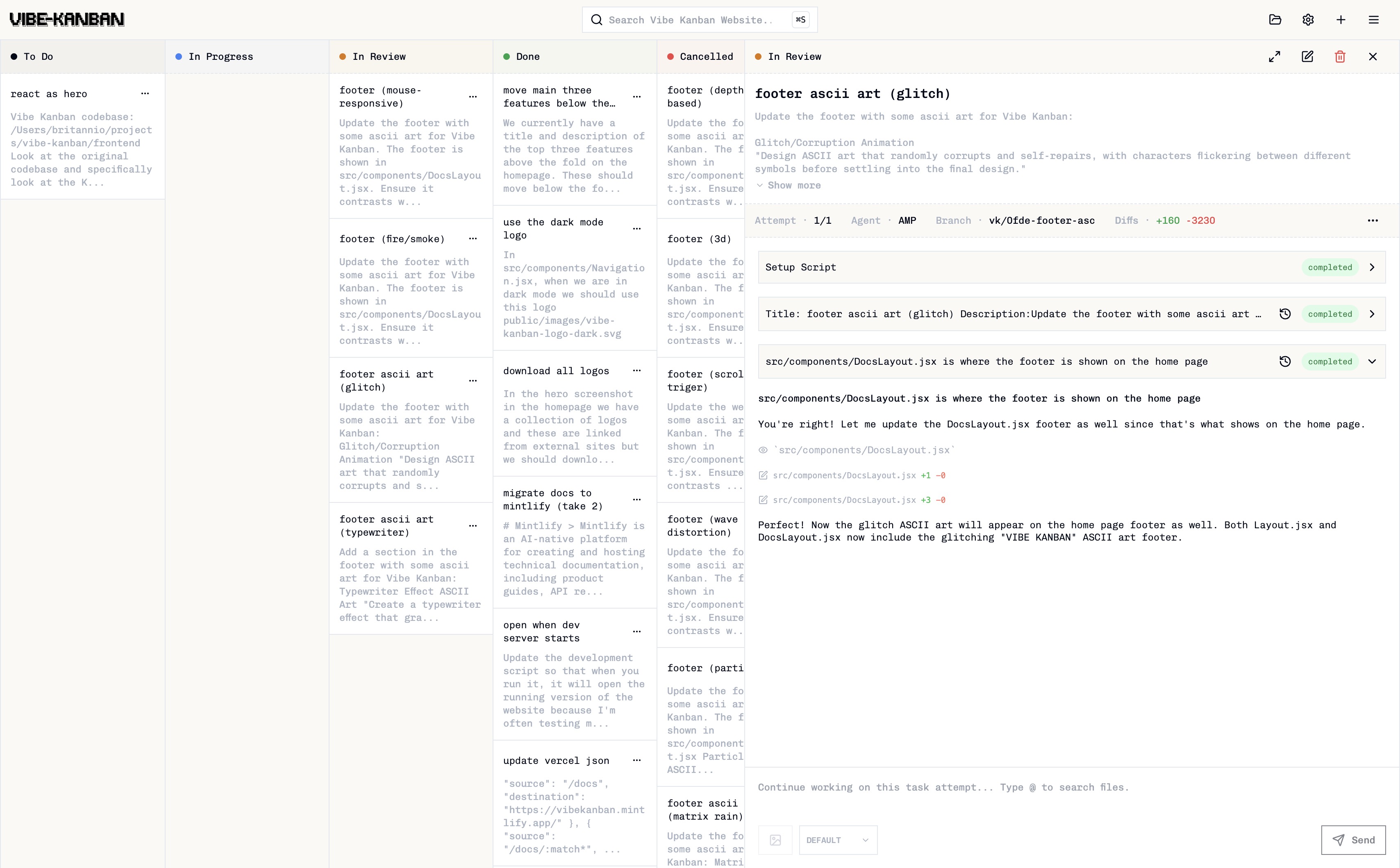
Vibe Kanban task preview interfaceVibe Kanban task preview interface
Vibe kanban is the biggest increase I've had in productivity since cursor.

Luke Harries profile

Luke Harries

Growth Lead at Eleven Labs

Choose Your Coding Agent

Works seamlessly with all your favorite AI coding agents.

Run local coding agents in parallel

Instead of staring at coding agent logs you can focus on planning and reviewing work while your coding agents work in the background.

Give agents their own workspace

Agents work in separate branches and workspaces on your machine (powered by git worktrees), so they never step on each other's toes during parallel execution. Safely merge changes back when tasks complete.

Review agent changes like human code

Built-in diffs let you inspect, edit, and approve agent work just like any pull request.

Stay ahead of the curve

Thousands of top developers use Vibe Kanban daily to orchestrate AI coding agents

jarrett-au/ootd-mate
2d
Foundation: Setup Monorepo Structure (vibe-kanban)
Create the basic monorepo structure with Turborepo including: 1. Root configuration files: - package.json with Turborepo scripts and workspace config - turbo.json for build orchestration - pnpm-workspace.yaml for workspace definition - .env.example with all required environment variables 2. Backend foundation (apps/backend/): - package.json for Prisma CLI - pyproject.toml with FastAPI dependencies - prisma/schema.prisma with complete database schema (User, ClothingItem, Outfit, OutfitClothingItem, Conversation, Message, Collection) - app/main.py with FastAPI app and CORS setup - app/core/config.py for settings management - app/storage/ with interface.py, local.py, __init__.py for storage abstraction 3. Frontend foundation (apps/frontend/): - Initialize Next.js with: npx create-next-app@latest . --typescript --tailwind --eslint --app --src-dir --import-alias "@/*" --no-git - Initialize shadcn/ui: npx shadcn-ui@latest init - Add shadcn components: button card dialog input label select toast dropdown-menu avatar - Create .env.local with NEXT_PUBLIC_ variables - Create src/lib/api.ts with API client - Create src/lib/utils.ts with cn helper 4. Shared package (packages/shared/): - package.json and tsconfig.json - src/types/user.ts with User and UserProfile interfaces - src/types/clothing.ts with ClothingItem interface - src/types/outfit.ts with Outfit interfaces - src/index.ts exporting all types 5. Initialize database: - Run: cd apps/backend && npx prisma migrate dev --name init - Run: npx prisma generate 6. Install dependencies: - Run: pnpm install from root Acceptance criteria: - pnpm install succeeds without errors - pnpm dev starts both frontend (port 3000) and backend (port 8000) - Backend /health endpoint returns {"status": "healthy"} - Frontend loads at http://localhost:3000 - apps/backend/dev.db SQLite database created - Prisma Studio works
jarrett-au
jarrett-au
Contributor
merged
RBirkeland/greenfield-test
2d
Install and integrate Vibe Kanban Web Companion (vibe-kanban)
Goal: Install and integrate the vibe-kanban-web-companion so it renders at the app root in development. Do: 1) Detect package manager from lockfiles and use it: - pnpm-lock.yaml → pnpm add vibe-kanban-web-companion - yarn.lock → yarn add vibe-kanban-web-companion - package-lock.json → npm i vibe-kanban-web-companion - bun.lockb → bun add vibe-kanban-web-companion If already listed in package.json dependencies, skip install. 2) Detect framework and app entry: - Next.js (pages router): pages/_app.(tsx|js) - Next.js (app router): app/layout.(tsx|js) or an app/providers.(tsx|js) - Vite/CRA: src/main.(tsx|jsx|ts|js) and src/App.(tsx|jsx|ts|js) - Monorepo: operate in the correct package for the web app. Confirm by reading package.json and directory structure. 3) Integrate the component: import { VibeKanbanWebCompanion } from 'vibe-kanban-web-companion'; - Vite/CRA: render <VibeKanbanWebCompanion /> at the app root. - Next.js (pages): render in pages/_app.* - Next.js (app): render in app/layout.* or a client providers component. - For Next.js, if SSR issues arise, use dynamic import with ssr: false. 4) Verify: - Type-check, lint/format if configured. - Ensure it compiles and renders without SSR/hydration errors. Acceptance: - vibe-kanban-web-companion is installed in the correct package. - The component is rendered once at the app root without SSR/hydration errors. - Build/type-check passes. <!-- This is an auto-generated comment: release notes by coderabbit.ai --> ## Summary by CodeRabbit * **New Features** * Integrated Vibe Kanban Web Companion for enhanced task-tracking capabilities * Added application title and header display * **Documentation** * Expanded specification documentation with enhanced validation details and implementation guidance * Updated development workflow documentation with explicit requirements and tool references * **Chores** * Updated project configuration to support modern JavaScript standards * Refined documentation templates and formatting across project * Added required project dependency <sub>✏️ Tip: You can customize this high-level summary in your review settings.</sub> <!-- end of auto-generated comment: release notes by coderabbit.ai -->
RBirkeland
RBirkeland
Contributor
merged
jarrett-au/ootd-mate
2d
Foundation: Setup Monorepo Structure (vibe-kanban)
Create the basic monorepo structure with Turborepo including: 1. Root configuration files: - package.json with Turborepo scripts and workspace config - turbo.json for build orchestration - pnpm-workspace.yaml for workspace definition - .env.example with all required environment variables 2. Backend foundation (apps/backend/): - package.json for Prisma CLI - pyproject.toml with FastAPI dependencies - prisma/schema.prisma with complete database schema (User, ClothingItem, Outfit, OutfitClothingItem, Conversation, Message, Collection) - app/main.py with FastAPI app and CORS setup - app/core/config.py for settings management - app/storage/ with interface.py, local.py, __init__.py for storage abstraction 3. Frontend foundation (apps/frontend/): - Initialize Next.js with: npx create-next-app@latest . --typescript --tailwind --eslint --app --src-dir --import-alias "@/*" --no-git - Initialize shadcn/ui: npx shadcn-ui@latest init - Add shadcn components: button card dialog input label select toast dropdown-menu avatar - Create .env.local with NEXT_PUBLIC_ variables - Create src/lib/api.ts with API client - Create src/lib/utils.ts with cn helper 4. Shared package (packages/shared/): - package.json and tsconfig.json - src/types/user.ts with User and UserProfile interfaces - src/types/clothing.ts with ClothingItem interface - src/types/outfit.ts with Outfit interfaces - src/index.ts exporting all types 5. Initialize database: - Run: cd apps/backend && npx prisma migrate dev --name init - Run: npx prisma generate 6. Install dependencies: - Run: pnpm install from root Acceptance criteria: - pnpm install succeeds without errors - pnpm dev starts both frontend (port 3000) and backend (port 8000) - Backend /health endpoint returns {"status": "healthy"} - Frontend loads at http://localhost:3000 - apps/backend/dev.db SQLite database created - Prisma Studio works
jarrett-au
jarrett-au
Contributor
merged
RBirkeland/greenfield-test
2d
Install and integrate Vibe Kanban Web Companion (vibe-kanban)
Goal: Install and integrate the vibe-kanban-web-companion so it renders at the app root in development. Do: 1) Detect package manager from lockfiles and use it: - pnpm-lock.yaml → pnpm add vibe-kanban-web-companion - yarn.lock → yarn add vibe-kanban-web-companion - package-lock.json → npm i vibe-kanban-web-companion - bun.lockb → bun add vibe-kanban-web-companion If already listed in package.json dependencies, skip install. 2) Detect framework and app entry: - Next.js (pages router): pages/_app.(tsx|js) - Next.js (app router): app/layout.(tsx|js) or an app/providers.(tsx|js) - Vite/CRA: src/main.(tsx|jsx|ts|js) and src/App.(tsx|jsx|ts|js) - Monorepo: operate in the correct package for the web app. Confirm by reading package.json and directory structure. 3) Integrate the component: import { VibeKanbanWebCompanion } from 'vibe-kanban-web-companion'; - Vite/CRA: render <VibeKanbanWebCompanion /> at the app root. - Next.js (pages): render in pages/_app.* - Next.js (app): render in app/layout.* or a client providers component. - For Next.js, if SSR issues arise, use dynamic import with ssr: false. 4) Verify: - Type-check, lint/format if configured. - Ensure it compiles and renders without SSR/hydration errors. Acceptance: - vibe-kanban-web-companion is installed in the correct package. - The component is rendered once at the app root without SSR/hydration errors. - Build/type-check passes. <!-- This is an auto-generated comment: release notes by coderabbit.ai --> ## Summary by CodeRabbit * **New Features** * Integrated Vibe Kanban Web Companion for enhanced task-tracking capabilities * Added application title and header display * **Documentation** * Expanded specification documentation with enhanced validation details and implementation guidance * Updated development workflow documentation with explicit requirements and tool references * **Chores** * Updated project configuration to support modern JavaScript standards * Refined documentation templates and formatting across project * Added required project dependency <sub>✏️ Tip: You can customize this high-level summary in your review settings.</sub> <!-- end of auto-generated comment: release notes by coderabbit.ai -->
RBirkeland
RBirkeland
Contributor
merged

Create tasks from other apps

Connect your favorite MCP client like Claude Desktop to access Vibe Kanban's capabilities directly from your personal AI assistant and extend your workflow beyond the interface.

This project is underrated. I've found it to be useful and fun.

Hamel Husain profile

Hamel Husain

Leading AI Consultant, 20 Years of Experience

Work from your IDE

Monitor agents, interact with them, perform code review, and see running processes directly in your IDE.

Motivation

Coding agents are reliable enough to be the default: We've built and tested coding agents for years and realised recently that reliability crossed an invisible threshold that means we now prefer starting most tasks with coding agents.

Coding agents are going to get much better: Coding agents have improved rapidly, and we expect this trend to continue. Imagine that in six months, 50% of the current failure modes of coding agents will get fixed, and six months after that another 50%. What will we (engineers) be spending our time on in that world? What tools would help us do that work most efficiently?

The SOTA will change: Foundational model labs and application layer startups will continuously leap-frog each other to build state-of-the-art coding agents over the next 12m+. You shouldn't have to change your workflow or behaviour to be able to try out different coding agents.

FAQs

Common questions about Vibe Kanban and how to get the most out of your AI coding agents

Yes, Vibe Kanban runs locally on your machine and doesn't send your code to external servers.
Vibe Kanban supports a wide range of coding agents including Claude Code, Gemini CLI, Cursor CLI, Amp, OpenAI Codex, Qwen Code, Opencode, and GitHub Copilot. You can find the complete list of supported agents in our documentation at vibekanban.com/docs. You can use multiple agents simultaneously and switch between them for different tasks.
Vibe Kanban itself is free and open source. You only pay for the underlying AI services (like Claude Code, OpenAI Codex, etc.) that you choose to use with your agents. There are no additional fees or subscriptions for using Vibe Kanban.
Absolutely! One of Vibe Kanban's key features is parallel execution. You can run multiple coding tasks simultaneously across different agents and projects. Each task runs in its own git worktree on your machine.
The VS Code extension brings the task view into your IDE. Search for 'Vibe Kanban' in the VS Code marketplace and it will automatically connect to your local Vibe Kanban instance.
MCP (Model Context Protocol) works with Vibe Kanban in two ways: First, you can connect MCP servers to your coding agents so they can access external resources and tools. Second, Vibe Kanban itself exposes an MCP server that you can connect to from third-party MCP clients like Claude Desktop, allowing you to seamlessly create tasks from third-party clients.
Yes! Vibe Kanban allows you to create reusable task templates to standardise your development processes. You can define templates for common tasks like bug fixes, feature implementations, or refactoring, which helps boost team productivity and consistency.
Yes, Vibe Kanban has seamless GitHub integration. It can automatically create pull requests after task completion, handle rebases and merges with one-click operations, and maintain clean git history. This makes it easy to incorporate AI-assisted development into your existing workflow.
Vibe Kanban provides real-time monitoring and control over agent execution. You can pause, resume, or stop agents at any time. The system also provides detailed logs and step-by-step visibility, making it easy to understand what went wrong and intervene when necessary.

Ready to get started?

Start managing your AI coding agents with Vibe Kanban.

Install Node.js 18+ then run:

$npx vibe-kanban